Posts

Showing posts with the label Tech Tip

Tech Tip: Canvas Profile

For my canvas profile, I changed the avatar picture to a personal picture of myself.  I'd just feel kind of weird putting a different picture that's not myself.  I added my email to my biography because I wouldn't use the biography for anything else really.  I don't really need to change anything else, since I go by my own name. 

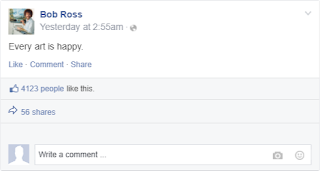
Fake Social media Tech Tip

Image
I used Facebook from prankmenot.com because the other site was being wonky.

Google Define Tech Tip

Image
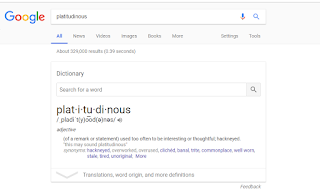
When I usually write things for any class, I find myself having words come up to my head as I write.  Sometimes, these are pretty big words, and I find myself not using the word appropriately.  So a tool that I use a lot is Google to define words that I need to check up the exact definition on.  I don't really use the etymology function of it much though since I'm not too interested in that.  

Tech Tip: Troubleshooting

Sometimes I get a problem when signing into school websites such as One, Canvas, etc, and I get an error message that doesn't make too much sense.  Usually, it's because of cookies or cache.  An easy short-term solution is to open up the browser in incognito to log in.  It ignores your cookies or cache and settings in case you just need to check something in a hurry and don't have time to delete your cookies, cache, or restart your computer.

Tech Tip: Canvas Notifications

This week, I decided to do the Canvas Notifications Tech Tip.  I ended up changing many of my options.  Some options, such as due dates and grading, were set to go on a daily reminder, however, I would much prefer to have them come to my email immediately.  Some options, such as scheduling, I don't really use, so I set them not to notify me.  The Canvas Notifications settings are really useful so that you can get the perfect fine tuning you need.  Some information is needed urgently, while some information isn't important at all, so it really helps that you get to choose differently for each different individual option.

Tech Tip: Chrome Art

The extension is pretty cool, but I wouldn't categorize it as absolutely necessary.  It can be useful if you need something to periodically inspire you, but personally, I don't think it's for me.  I don't really care about images too much, but I know that some people do, so I think that this would be a good extension for those people.  I'm not into museums if it's mainly artwork unless it's an artwork that details an interesting historical event.  I'd prefer a science museum as compared to an artwork museum though.

Tech Tip: Canvas Calendar

For this week on my Tech Tip, I took a look at my Canvas Calendar.  Usually, I will go to my Canvas Calendar on the Canvas Website in order to see what assignments I have for the week.  However, with just using the Canvas Calendar, I cannot see my personal events, and it just makes it a hassle to see how my schedule is like overall.  A good tip is to use the iCal link by clicking on "Calendar Feed" on the right of your Canvas Calendar, and you can import your Canvas Calendar into another Calendar such as Google Calendar or Outlook Calendar.  A drawback for this is that it does not import events in Canvas that you, yourself, created, so you have to do that manually in your own calendar.  This brings me to my second tip for the Canvas Calendar, which is "creating your own events".  A couple of my professors do not put their assignments on the Canvas Calendar, because their assignments are either in-paper or on a 3rd party website, and this has cost me so...
Tech Tip: Canvas Mobile App

Ever since I started to use Canvas, I have had the Canvas App downloaded into my phone.  In my own experience, it is definitely worth it to have it downloaded to your phone.  Although expectedly, the app is more limited than the full version, there's still a lot to use with it.  For example, in the app, there is not a calendar with the assignments.  The assignments are with its respective classes.  A good feature that I've used multiple times is that you can upload a document straight from the Canvas app to the WEPA printer app to a WEPA printer on campus without it being difficult.  Overall, the Canvas App has its uses but it has a limited functionality. 

Tech Tip: Wordcounter

I really think that this tool is really useful.  I'm used to using the wordcounter website, but that gets a little tedious.  It's just a lot easier to have an extension to word count instantly.  It really depends on how much I write.  If I can get into the groove of writing something, then I'll usually write a lot, and then I will end up writing the maximum word count.  But if I can't get into the groove, I'll usually end up writing the minimum.  It all really depends on my mood

Tech Tip: Reverse Image Search

Image
Princess Sita's Kidnap

Typing Test Tech Tip

One of the most important skills, if not the most important, of handling technology is typing.  It's always a good idea to brush up on typing skills because it can transfer to many aspects of your life such as your personal life and professional life.  My favorite typing website is TypeRacer  because it lets me be competitive with my typing. 

Tech Tip: Announcements email

Image
While I do usually check Canvas at least once every day (even multiple times every day), I sometimes forget.  I especially forget when there's a school break or it's Friday and the weekend is coming up.  However, subscribing to receive announcements through email is really nice, because I use my email for non-school related stuff too, so I find myself checking my email more often than checking Canvas.  I check my email at least once a day 

Tech Tip: Google Timer

Image
I've actually been using the google timer (when you Google search for "timer") many times recently.  It's actually always been for one reason only. Sadly, it's because I need a nap.  Sometimes I'll have homework or studying that needs to be done before class, and it'll be like 2am.  I just need a quick doze for 20 mins to refresh my brain.  I used to do this on my phone, but I'm such a heavy sleeper, and I subconsciously learned how to turn my phone alarm off while I'm still in my sleep, causing me to oversleep.  But the Google Timer is nice because I can make it loud enough to wake me up completely and get my work done. My Nap Device